
Your Azure Tenant Is a Policy Landfill
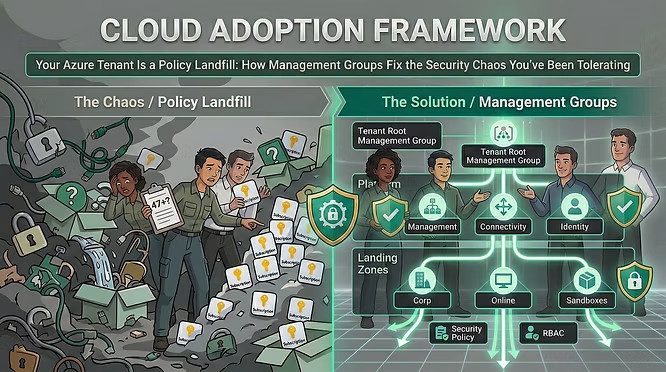
Cloud Adoption Framework – How management groups fix the security chaos you’ve been tolerating
On her first day, Marta opened the Azure portal and counted the subscriptions sitting directly under the root management group. Forty-seven.
No hierarchy. No inherited policy. No consistent RBAC. Security alerts lighting up Defender for Cloud with no clear owner. Every team had provisioned what they needed, when they needed it, under whoever had Owner rights that week. The tenant had been growing for three years. Nobody had ever drawn a line in the ground and said: this is how things are structured here.
This is the most common state of a mature Azure environment. Not a breach. Not a misconfiguration in one resource. A structural problem — the absence of a security foundation that makes everything else possible.
The Management Group Is Not an Organisational Chart
The first mistake most teams make with Azure management groups is treating them like a reflection of their org chart. Finance subscriptions under a Finance group. Marketing under Marketing. IT under IT. Tidy on a slide deck. Useless for security.
Management groups exist for one reason: to give you a place to assign Azure Policy and RBAC roles that inherit downward to every subscription and resource beneath them. That means your hierarchy should reflect security posture and connectivity requirements — not business units.
The CAF management group guidance is clear: keep the hierarchy flat (three to four levels is the target), and resist the pull of depth. A six-level hierarchy exists as a hard platform limit. You should never get close to it.
“Don’t duplicate your organisational structure into a deeply nested management group hierarchy. Use management groups for policy assignment versus billing and RBAC purposes.” -Microsoft CAF, Management Groups
The Architecture That Actually Works
The Azure landing zone reference architecture defines a management group structure that has been validated across thousands of enterprise deployments. It looks like this.
Intermediate Root — Sits directly under the tenant root. All other groups live here. Isolates your hierarchy from the root group and allows you to move existing subscriptions in.
Platform — Contains Management, Connectivity, Identity, and Security child groups. These host the shared infrastructure subscriptions your whole organisation depends on.
Security — Dedicated subscription for Microsoft Sentinel, syslog collectors, and SIEM tooling. The security team owns this. Nobody else.
Management — Azure Monitor Logs workspace, Log Analytics solutions, and monitoring infrastructure.
Connectivity — Azure Firewall, Virtual WAN, DNS private zones, network gateways. The highway your workloads drive on.
Identity — AD DS domain controller VMs or Microsoft Entra Domain Services for workloads that need traditional domain join, LDAP, or Kerberos. Pure Entra ID-only organisations typically skip this group entirely.
Landing Zones — Parent group for all workload subscriptions. Policy assignments here apply to everything your teams build. Corp — Workloads that need hybrid connectivity back to on-premises via the hub in Connectivity.
Online — Workloads that need direct internet access, with or without a VNet.
Sandboxes — Isolated from Corp and Online. Less restrictive policy. For experimentation and exploration only.
Decommissioned — Landing zones awaiting deletion. Moved here before Azure removes them in 30–60 days.

This is not a theoretical model. Deploy it via the Azure Landing Zones Bicep templates and you get the hierarchy, the RBAC assignments, and the initial policy set in a single deployment flow.
Policy Flows Down. That’s the Point.
Every Azure Policy or Policy Initiative assigned at a management group level is inherited by every subscription and resource group beneath it. Assign a policy to your Intermediate Root group and it applies everywhere. Assign to Landing Zones and it applies to every workload subscription — Corp and Online alike.
This is how you enforce security at scale without manual intervention. The CAF security design area recommends a specific set of baseline policies for online and corporate-connected landing zones:
You assign these once — at the Landing Zones management group — and every workload subscription that gets vended into Corp or Online inherits them automatically. The developer team provisioning a new service gets a subscription that is already compliant before they deploy their first resource.
Policy at root: be conservative. The CAF guidance explicitly recommends limiting policy assignments at the root management group. Debugging why a policy inherited from root is blocking a deployment seven layers down is a miserable afternoon. Assign only the broadest, most universal controls at root. Everything specific goes at Landing Zones or below.
RBAC at Management Group Scope: Use It Carefully
RBAC assignments also inherit downward. Which means assigning the Contributor role to a team at the Management Group level gives them access to every subscription in that group — and every subscription that gets added in the future.
That is powerful. It is also dangerous if misused. The management group recommendations are explicit: don’t assign application team permissions via RBAC at management group scopes. Give them access at the subscription or resource group level — usually handled through the subscription vending process.
Platform teams are the exception. They often need cross-subscription access to do their jobs. But even that should be gated behind Microsoft Entra Privileged Identity Management (PIM) — just-in-time access, not permanent standing rights. A platform engineer shouldn’t have permanent Owner on every subscription in the tenant because it’s convenient.
Sandboxes and the Temptation of Permanent Exceptions
Every landing zone architecture needs a sandbox group. The sandbox management group deliberately has a less restrictive policy set — it’s where teams experiment, explore new Azure services, and break things safely. That is its job.
The failure mode is when the sandbox becomes a permanent production environment by accident. A prototype that never got moved to Corp. A one-off pipeline still running in a subscription that was supposed to be temporary. The Decommissioned group exists for a reason: subscriptions that outlive their purpose belong there, not in Sandboxes indefinitely.
Configure a default management group so that new subscriptions don’t land under the root management group. Any subscription landing at root has no policy inheritance and no defined RBAC structure. Set the default to Sandboxes. At least then there’s a fence.
Region-Based Hierarchies: Don’t Do It
One of the most persistent mistakes in multi-region deployments is building a management group tree that mirrors geography. A Europe group. An Americas group. An APAC group. It looks organised. It fights you at every turn.
The CAF is unambiguous: don’t create management groups solely to model different Azure regions. Don’t alter your hierarchy based on multi-region usage. The one exception is genuine regulatory requirements — data residency, data sovereignty — where you need location-based policy controls. In that case, a location-based structure at a specific level in the hierarchy is defensible. Convenience is not a qualifying reason.
Marta’s Second Week
By the end of her first week, Marta had a proposal on paper: an Intermediate Root group, Platform and Landing Zones beneath it, subscriptions mapped to Corp or Online based on their connectivity needs, the security team’s Sentinel workspace moved into a dedicated Security subscription under Platform.
Week two was migration. Forty-seven subscriptions don’t reorganise themselves. But once the structure was in place, the policy inheritance did the heavy lifting. Defender for Cloud recommendations stopped being noise and started being actionable. New teams got vended compliant subscriptions on day one. The alerts got owners.
That’s what a well-structured management group hierarchy buys you. Not security itself — but the foundation on which consistent, enforceable, auditable security becomes possible. You cannot bolt that on afterwards. The hierarchy has to come first.
Getting the hierarchy right is the hardest part
Most organisations come to Cloud Adoption Framework security governance too late — after subscriptions have proliferated, policies are inconsistent, and RBAC assignments have sprawled into something nobody fully understands. Rearchitecting a live tenant is harder than building it right from the start, and the decisions compound: every new subscription inherits whatever structure you have now, for better or worse.
Fortytwo works with organisations at exactly this inflection point — helping platform and security teams design landing zone architectures that hold under real operational pressure, and translating CAF principles into deployable Bicep and policy configurations that work in your specific environment. If your Azure tenant has grown faster than its governance, that’s the conversation to have.
Book a 30-minute chat →